What’s New?
The highlights of the current Exosphere release are below. For the complete history of past releases, see the Release Notes in the Reference section.
3.0.0 - Reboots, Palettes, Sorting and refreshed CLI
The first major version release actually backed by a major set of changes. This release lands several long overdue features, refactors a lot of internals, swaps out the entire CLI engine and provides a much more polished help and documentation experience.
It has been cooking for a while, and the release notes are correspondingly long. Most of these changes are transparent, but there are some unavoidable incompatibilities. Make sure to read User Actions Required and Incompatible Changes before upgrading.
Feature Highlights
Pending Reboot Detection
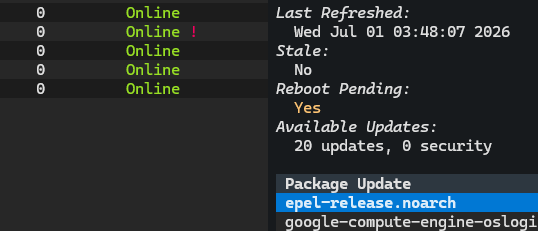
Exosphere can now tell you when a host is waiting on a reboot to finish applying
updates — a running kernel that no longer matches the installed one, a distro’s
reboot-required flag, and so on.
This is another feature grown out of a question that comes up frequently when managing updates across a fleet of hosts: “Has everyone been rebooted?”. It felt only natural for Exosphere to attempt to answer that question.
This is presented in several places across the application interfaces:
The CLI and inventory TUI status tables, as a small
!marker in the Status column — much like the existing*marker for stale dataDetailed host views (
host show, the TUI host details panel)Reports of every format (text, Markdown, HTML) and JSON output
The feature is implemented for all supported platforms where this information is available (Debian/Ubuntu, RHEL and derivatives, FreeBSD) and is entirely best-effort. None of the reboot checks require elevated privileges, so there is no sudoers change. If a provider cannot determine the status — a missing tool, an unexpected error — it is simply reported as unknown rather than failing the operation, so it will never block you from doing anything else.
TUI Command Palette Operations
For a long time the only way to perform targeted operations on a specific host
was to use the CLI host commands, or specify hosts in bulk inventory operations.
The TUI was previously limited to bulk operations, and on specific screens.
To resolve this, the TUI now makes use of the command palette (Accessible via
Ctrl+P) to allow you to run any of the host operations (sync, refresh,
ping, etc) from any screen, and targeting any host.
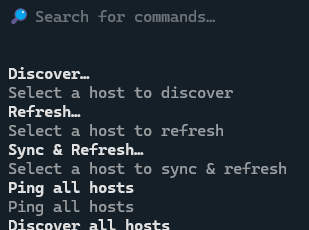
Selecting hosts also conveniently presents as a fuzzy search list, making the whole process light in keystrokes, and high in discoverability.
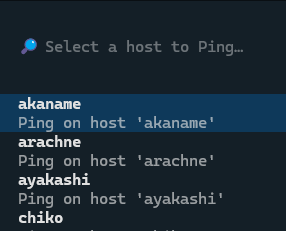
The palette will also preselect the currently highlighted host in the Inventory screen, further lubricating the process.
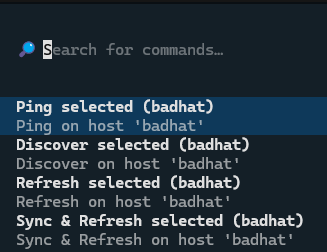
The palette and its operations can be invoked from any screen, and with this, there is finally functional parity between the CLI and TUI for host operations.
Inventory Sorting
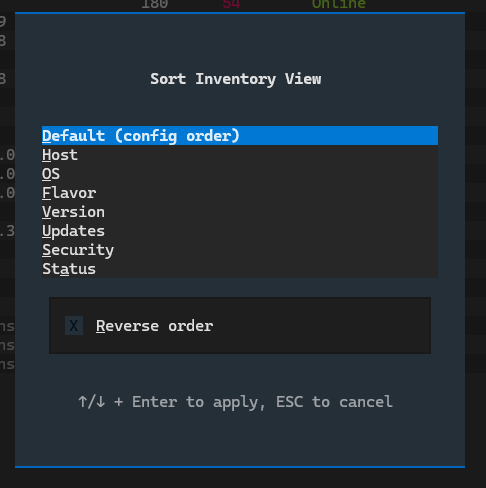

Inventories can now be sorted, in both the CLI and the TUI.
On the CLI,
statusand the inventory listing gained sort options, including a compound sort by flavor and a--fullview that includes the description for hosts.In the TUI, a sort modal lets you pick a field with quick-select keys and reverse the order with
r.
Undiscovered and unsupported hosts always sort last, so the interesting hosts stay at the top regardless of the chosen field.
Reworked Built-in Help and CLI Polish
Exosphere has swapped out its CLI framework internals, and with that came the perfect opportunity to give a polish pass to the built-in help system.
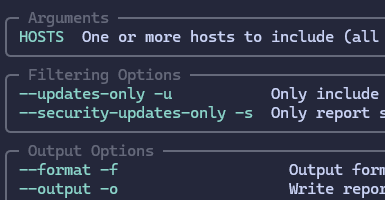
Multiple help panels, especially for the most complex commands like sudo or
report, have been rewritten to be more helpful, explain what they do, and most
importantly, group their copious options and flags into logical, meaningful sections.

Additionally, unknown commands or verbs will now display a helpful message, with fuzzy suggestions for what you might have meant, leading to a friendlier experience when exploring the CLI or REPL.
The CLI engine change also brings a lot of internal improvements and better behavior for both the CLI and REPL.
New Commands
A few small but helpful new commands have been added:
config edit– opens the current configuration file in your text editor, with proper validation and waits. The editor is determined by configuration,$EDITOR, or falls back to a platform default.report schema– exports the current JSON schema for the reporting system, to use as a reference or for validation in external tools.report status– a very short, two or three lines summary of the current state of the inventory. Suitable for inclusion in scripts or system MOTD.
All of these are documented more extensively in the Command Line Interface (CLI) docs as well as the Reporting and JSON Export docs.
The Web UI has been removed
It had always been more of an experimental curiosity than a real feature, and had not been actively developed since 1.0.0. Newer features (such as instance/cache locking) had begun to clash with it, and on balance it had become more of a maintenance burden than a useful capability.
As a result:
The
ui webstartcommand has been removed.The
weboptional dependency extra (textual-serve) is gone.A bare
uicommand now launches the TUI directly.ui startremains as a compatibility alias for launching the TUI, so existing muscle memory and scripts are not broken.
See the User Actions Required section for details.
Other Improvements
Task Dispatch Logic Improvements – the subsystem responsible for dispatching tasks to hosts has been refactored and unified across the CLI and TUI. This includes better handling of unsupported hosts, and preemptively skipping them in bulk operations where they would otherwise do nothing.
Remote command robustness – all remote commands now setup a POSIX-compliant, deterministic environment for execution. This includes running all provider commands under
/bin/sh, and pinning the locale to a known value. This makes reliability across login shells and localized server environments much more predictable.Cache file locking – Exosphere now takes a lock on the state cache to prevent two concurrent instances from writing to it at the same time.
Stricter configuration validation – malformed configuration files (non-mapping documents, and other structural problems) now produce clear, actionable errors instead of confusing downstream failures. Empty config files are handled gracefully.
Logging polish – Package Manager Providers now automatically prefix their log messages with the host that produced them, making the logs much more useful.
Non-TTY Handling – Exosphere now actively guards interactive-only features when running in a non-TTY environment, such as script, cronjob or similar. The primary side effect is that it prevents Exosphere from hanging while trying to read input it will never receive, and instead produces a clear error message.
Bugfixes
Exosphere
CLI and TUI now use the same descriptors for undiscovered hosts, instead of “(unknown)”.
Fixed latent config load issue with paths, which could result in environment variables not being applied correctly or ignored, in rare cases.
--versionflag no longer goes through the entire initialization process, and now prints the version immediately.TUI Inventory Screen now correctly preserves the cursor position when refreshing
Fixed issue where Dashboard host would fall back to “(unknown)” instead of “(unsupported)” when detected as Offline.
Cancelling a TUI Sync operation now also correctly aborts the follow-up Refresh, instead of infuriatingly continuing to run the next step of the chain.
Removed a spurious notification when a filter matched no hosts after an operation triggered a refresh in the TUI.
Providers
OpenBSD – Correctly handle flavors, quirks renames. All scenarios should now parse correctly.
RHEL – Fix issue parsing post-release snapshots, especially on Fedora and derivatives. Parsing has been lined up with upstream package name specs, and should be more robust from hereon.
User Actions Required
Shell completion must be reinstalled. The new CLI engine generates completion
differently, so re-run exosphere --install-completion to install the updated
scripts. On everything except PowerShell the new scripts take precedence and
the old ones are harmless leftovers. If you do not use the shell completion feature
at all, you have nothing to do. If you would like to remove the old scripts,
see the FAQ for the full details.
PowerShell completion is no longer supported and its leftovers must be cleaned up by hand, unfortunately, as there is no way around it. See the FAQ for the full details and cleanup steps.
Web UI has been removed. The ui webstart command and the web install
extra no longer exist. If you installed Exosphere as exosphere-cli[web],
drop the [web] extra from your install. Existing installations will automatically
resolve this on their own during upgrade, so there is no need to reinstall.
Use the TUI instead, which is now the default ui command.
Incompatible Changes
CLI Return Codes: The CLI now returns 1 for input errors, and 2 for runtime errors. This is a change from the previous behavior where this was reversed. Scripts that depended on the old behavior will need to be updated. The behavior of special status code 3 remains unchanged.
Multiple instances of Exosphere are no longer supported. This was never a supported configuration, given the semantics of the cache file, but it also was never explicitly protected against. The cache file is now locked to prevent concurrent access and a second instance will fail to start with a clear error message.
Project and Documentation
Licensing – the repository’s licensing was cleaned up into a REUSE-style layout, with a top-level
COPYRIGHT, per-license files underLICENSES/, and an explicit LLM contribution policy added to the README.Changelog system – release notes are now maintained in-repo as Markdown files under
changelog/, rendered into the docs by a small Sphinx extension that manages the index and “What’s New” page automatically. All 26 prior releases were backfilled.Docs refresh – the table of contents was reorganized with a new Concepts section, the CLI reference was reformatted, screenshots were refreshed for the new features, and most importantly, a significant polish pass was made, making this version of the online documentation the best so far. Many dense sections were split and reorganized for better legibility, including the FAQ.
What’s Changed
Add ability to sort inventory (CLI and TUI)
Unify undiscovered display, fix dashboard bug
TUI: Add Command Palette entries for Host Operations
Remove Typer, Replace with Cyclopts
Improve UI logging, cleanup loglevels
Improve CLI help formatting and validation logic
CLI: Skip unsupported hosts during sync and refresh
REPL: Fix help behavior for invalid subcommands
CLI: Add –install-completion support
UI: Add quick-select keys for sorting options
Add log caps to Application logs, REPL History
Main: Fix latent config load issue with paths
UI: Select Sort Modal entries via quick key
Add file locking to prevent concurrent cache use
Add config edit command, refactor CLI internals
Config: Add stricter schema validation
Cleanup Project Licensing
Add pending reboot detection feature
Remove Exosphere Web UI feature
redhat: Fix issue parsing post-release snapshots
Core: Enforce locale and shell for remote commands
TUI DataTable Improvements, preserve cursor position during refresh
CLI: Cleanup and improve help text for commands
docs: Reformat CLI reference docs
OpenBSD: Correctly handle flavors, quirks renames
Docs: Reorganize TOC, add Concepts, docs refresh
Docs: Add Changelog and Changelog Accessories
Reporting: Add schema export and status commands
Core: Cleanup task dispatch for unsupported hosts
Tests: Consolidate Host factory fixtures